A phone tracker app shows you where an Android device is, in real time, on a map — and the better ones add location history, arrival and departure alerts, and lost-phone recovery on top. For a parent, that means knowing your child made it to school without a stream of “where are you?” texts. For a small business, it means keeping track of company-owned devices in the field. This guide explains how Android phone tracking actually works, what the genuinely useful features are, why the free trackers are usually a bad trade, and how to set it up the right way — openly, with the person who carries the phone knowing it’s there.
That last point isn’t a disclaimer. In 2026 the whole category has moved toward consent-based tracking, and for good reason: a location tool a family agrees on builds trust, while one used behind someone’s back tends to destroy it the moment it’s found. It’s also the difference between lawful use and a serious legal problem. We’ll come back to that.
How Does Android Phone Tracking Work?
Most tracker apps rely on the phone’s built-in GPS, supplemented by Wi-Fi and mobile-network positioning to stay accurate indoors and in cities where the GPS signal is weaker. The app on the tracked phone reports its location to a secure online dashboard, which the parent or account owner views from their own phone or a browser. Under good conditions, that’s accurate to within a few metres.
A few practical realities are worth setting expectations on:
- It needs a data connection. Live tracking depends on the phone having mobile data or Wi-Fi. Some apps store locations locally and upload them once a connection returns, but real-time updates need the phone online.
- It uses battery. Any app doing continuous GPS tracking draws power. Well-built ones optimise this, but a tracker running all day will have some effect on battery life — worth knowing if the phone is already low by mid-afternoon.
- Setup happens on the phone itself. Tracking an Android device means installing and configuring the app on that device, with location permissions granted. There’s no legitimate way to track a phone you can’t physically set up, whatever some ads claim.
Why a Free Android Phone Tracker Is Usually a Bad Idea
Searching for a free phone tracker turns up plenty of options, and the price is tempting. But “free” tracking tools carry risks that often outweigh anything you save, and this is the part of the decision most worth slowing down on.
Your data becomes the product
Free trackers frequently request far more access than the job needs — contacts, messages, browsing history — and that data is often sold to third parties for advertising. With no subscription paying for the service, the data collected is usually how the app makes its money. Some keep harvesting information even after you stop using them.
Malware and spyware risk
Unverified tracking apps, especially ones side-loaded from outside the Play Store, are a well-known vector for malware. Some free “trackers” have been found to bundle spyware. Installing one to improve your family’s safety can quietly do the opposite.
Unreliable when it matters
Free tools tend to be inaccurate or delayed, with patchy alerts and little or no support. For casual curiosity that might not matter — but the entire point of a location tracker is to be reliable in the moment you actually need it, and that’s exactly where free tools tend to fail.
For anything involving a child’s safety, a reputable paid service with a clear privacy policy and a real support channel is the better call. It’s a small cost against the downside of a tool that leaks data or fails when it counts.
What a Good Phone Tracker App Actually Does
Location sharing is the baseline. What separates a genuinely useful family tracker from a bare dot-on-a-map is everything built around it:
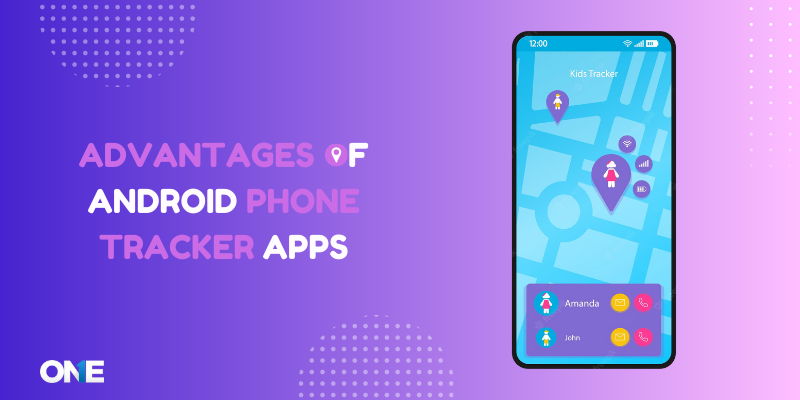
- Real-time GPS location — where the device is now, updated live on a map.
- Location history — a timeline of where the phone has been through the day, useful for confirming a routine without hovering.
- Geofencing — automatic alerts when the phone arrives at or leaves a set zone like home, school or work, which removes the need for constant check-in messages.
- Safe-zone and SOS alerts — notifications tied to specific places, and on many apps a panic button the child can trigger in an emergency.
- Battery alerts — a heads-up when the tracked phone is running low, which is often the real reason someone becomes unreachable.
- Cross-platform support — the ability to track across Android and iPhone from one dashboard, since most families aren’t on a single platform.
Who Uses Phone Tracking, and Why
Parents
The most common use is simple reassurance: confirming a child reached a destination safely, coordinating pickups, and having a last-known location if a phone is lost or a child is unreachable. Used openly, it can also be a gentle framework for giving a younger teen more independence — the freedom to go further, with a safety net both sides agreed on.
Lost or stolen phones
A tracker turns a lost phone from a crisis into an inconvenience. Location history and a live map make recovery far more likely, and remote-lock features on many apps protect the data in the meantime. (Android’s own free Find My Device does the basics of this too — worth knowing before you pay for anything.)
Businesses with company devices
Employers can track company-owned Android devices to coordinate field teams, confirm coverage, and protect equipment — provided employees are informed and it’s on company hardware. Fleet and field-service tools built for this centralise multiple devices on one dashboard. The consent rule is not optional here either; tracking staff without their knowledge is unlawful in most jurisdictions.
The Line Between Lawful Tracking and a Serious Problem
This matters enough to state plainly. Tracking the phone of a child you’re responsible for, or a company device an employee knows is monitored, is lawful and legitimate. Tracking another adult’s phone without their knowledge and consent — a partner, an ex, anyone — is not. In many places it’s a criminal offence, and it’s the kind of use this site doesn’t support.
The practical test is consent. If the person carrying the phone knows the tracker is there and has agreed to it, you’re on solid ground. If the main appeal of a tool is that the person won’t know, that’s the signal to stop. Beyond the legal exposure, concealment is self-defeating with a teenager: the trust that actually keeps them safe is worth more than any location ping, and it doesn’t survive being tracked behind their back.
Start With What’s Free and Built In
Before paying for anything, use the tools already on the phone:
- Google Find My Device locates, locks and erases a lost Android phone at no cost.
- Google Family Link adds location, screen-time limits and app management for a child’s account, free.
- Apple Screen Time and Find My cover the same ground on iPhone and iPad.
For many families, these are enough. The reason to look beyond them is usually the extras — geofencing with custom zones, richer location history, alerts, and one dashboard spanning both platforms and multiple children. If you’re weighing paid options, our parental control app comparison lines the main ones up feature by feature, including where rivals do a job better.
Where TheOneSpy Fits
If the built-in tools don’t cover what you need, TheOneSpy is an Android phone tracker with real-time GPS, location history, geofencing with entry and exit alerts, and remote lock, managed from a single dashboard across Android, iPhone and iPad, Windows and Mac. On iPhone and iPad, Apple’s restrictions mean the picture is narrower than on Android — we’d rather say that plainly than have you find out after paying.
The condition is the same as everywhere on this site: it’s built for open, consent-based use — a child who knows the tool is there, or a company device an employee is aware is managed. Used that way, location tracking is a safety net. Used any other way, it’s a problem we’d rather you didn’t create.
Frequently Asked Questions
How can I track an Android phone?
Install a phone tracker app on the Android device, grant it location permissions, and view its position from a dashboard on your own phone or a browser. Google’s free Find My Device handles lost-phone location, Family Link adds child-account tracking, and paid apps add geofencing, location history and cross-platform support. Whatever you use, the phone has to be set up directly — there’s no legitimate way to track a device you can’t physically access, and the person carrying it should know it’s there.
Is there a free phone tracker app for Android?
Yes — Google Find My Device (lost-phone location, lock and erase) and Family Link (child-account location and controls) are both free and built by Google. Third-party “free” trackers are a different matter: they often over-collect data, sell it on, can carry malware, and tend to be unreliable. For a child’s safety, a reputable paid service with a clear privacy policy is usually the safer choice.
Can I track a phone without the person knowing?
You shouldn’t, and in many cases you legally can’t. Tracking your own child or a company-owned device an employee knows about is lawful. Tracking another adult’s phone without consent — a partner or ex, for instance — is unlawful in many places and can be a criminal offence. Beyond the law, concealed tracking destroys the trust that actually keeps a teenager safe. Legitimate tracking is done with the person’s knowledge.
Does a phone tracker drain the battery?
Some, yes — any app running continuous GPS uses power. Well-optimised trackers keep the impact modest, but expect some effect if location updates run all day. Many apps include a low-battery alert for the tracked phone, which is useful because a dead battery is the most common reason someone suddenly can’t be located.
What features matter most in a family tracker?
Accurate real-time location and location history are the core. The features that make one genuinely useful are geofencing (automatic alerts when a phone reaches or leaves a place), an SOS or panic button, battery alerts, and cross-platform support so you can track Android and iPhone from one place. Clear privacy controls and consent-based setup matter as much as any feature.
Sources
- Google Find My Device — free lost-phone location, lock and erase for Android
- Google Family Link · Apple Find My — free built-in location and family controls