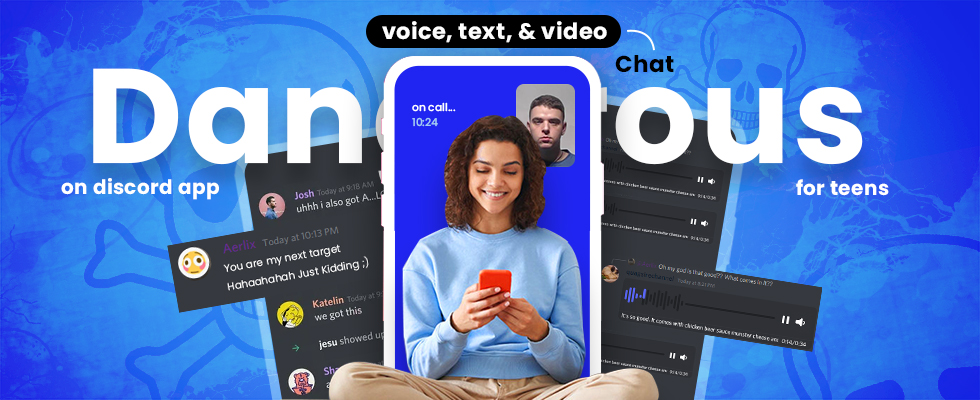
The social media apps have created a mess for parents over the years. It has doubled the worries for parents. Do you know why? Is Discord safe for teens? You might not know how voice chat, text, and video chat are dangerous on the Discord messenger app. Experts are warning parents not to let their minors use social messaging apps using internet browsers on mobile phones and PC devices. Teens use the Discord app to spend a handful of time together.
Young kids are more likely to create school clubs, art communities, and gaming groups on social networks. However, teens are making themselves vulnerable to public chat communities, called “servers”. So, parents look forward to monitoring the Discord messenger app to supervise teens for their online safety.
What is the Discord App?
Before we guide you about safety, know something that is key to kids’ online safety. Discord is a free communication app that keeps a hybrid between a chat room. Let’s people connect through text, voice, and video chat. Originally made for gamers, it’s now widely used by communities, friends, and even classrooms to chat, share media, and join topic-based groups called servers. The purpose of the public community app is to enable gamers to collaborate without losing the game’s processing power. Gamers can overlay the app directly on the video games to chat in a one-on-one chat room.
Discord vs Traditional Social Media: The Ultimate Comparison
General social media apps provide users with a public area for a newsfeed, but Discord is free from it. The social messaging app has closed groups called “servers” known as “Discord”. Users can create servers, but directory servers are not available. Your friends will let you join their servers to chat, voice chat, and video chat while playing video games. The social app has become popular among gamers and art communities worldwide.
Community Structure: Unlike Facebook or Instagram’s single newsfeed, Discord is organized into servers (private or public) spaces where people gather around shared interests and topics.
Real-Time Communication: Discord focuses on live voice, video, and text chat, similar to Zoom or Teams, while most social media platforms focus on posts and likes.
Privacy & Access: Servers and chats can be invite-only, giving users more control over who joins, unlike open platforms like Twitter/X or TikTok.
No Algorithmic Feed: Content is organized in channels within servers, not pushed by an algorithm, so users see conversations in real-time.
Gaming Integration: Built with gamers in mind, Discord integrates with PC and console games for streaming and in-game communication, unlike general social apps.
Customization: Users can create bots, roles, and permissions to personalize servers, a level of control not found on apps like Instagram or Snapchat.
Is Discord Safe for Teens? Hidden Dangers Exposed
Young teens who are good at playing video games are more likely to find their way to the Discord chat service. Your child could face bad and ugly racist memes. The free social messaging service is easily accessible on cell phones and PCs.
Teens can interact with strangers in real-time using voice, text, and video chat. Young Discord users are more likely to communicate while playing video games. The messaging app has more than 250 million active users and exchanges 850 million messages daily.
Young teens could face cyberbullying, shared nudes, and access to adult content in hidden communities. Young kids play multiplayer video games and often face racial slurs, sexy comments, sexting, game-shaming, encounters with child traffickers, and sexual predators.
- Discord is a dangerous app for teens because it is tough to cope with real-time communication.
- Discord has made it easy for online predators to contact young children in public communities.
- Predators can lie on Discord about who they are to stalk them via chatting and VoIP.
- Discord has made cyberbullying easier than ever before. Closed groups encourage kids to become bullies online
How Predators Target Teens on Discord – What Parents Must Know
Do you know how online predators could trap your teens on the Discord app? Here is the CNN-reported news story about the dark side of the Discord social app that every parent should read, and opt for Discord monitoring solutions to supervise children.
A single mother in Washington State has seen her daughter on Discord, a popular social messaging platform. The mother thought her daughter created an account to chat with the high school marching band.
Irrespective of that, in September, the mother dramatically discovered a 16-year-old tween using VoIP calls audio-video with an older man.
The stranger has introduced himself as a British citizen. A stranger added her daughter and members of the school band.
The young girl met with the older man through a private thread and became friends with him.
After a couple of days, the stranger asked for nudes from her daughter.
Mother was shocked to see that her daughter obliged the request.
The mother has snooped into the chats manually. The Disturbing thing was that her daughter shared photos of her house and school information.
So, the stranger has all the information about the home, location, school, and dozens of nude images of her 16-year-old daughter. The suspected predator has also got the pictures of her daughter’s friends.
Finally, the mother becomes worried and knows how Discord users have groomed her daughter. Mother has shut down the Discord account, and so many efforts have been made to install the outdoor security cameras to monitor her house 24/7.
Parents Alert: Experts Warn Against Kids Using Discord
From gamers to school friends, teens everywhere are joining Discord, the app that’s exploding in popularity. Experts have warned parents to stop or supervise teens when they use new popular messaging apps like Discord on their phones and PCs connected to the internet.
Discord is a social communication platform that enables teens to use Video calls, text messaging, and voice chat, which is best for many explicit means. It has gained popularity through famous gaming systems like Xbox and PlayStation. Teens can use the Discord app on their smartphones and computer devices.
Social media apps have numerous features, like voice calls, video calls, and text messaging in public chat communities. Users can create communities following their interests. Teens can sign up on the social messaging app without identifying their age.
According to Cassidy Crino, MDT Facilitator at the Victim’s Assistance Centers’ Child Advocacy Center, warned that Discord’s social media features can expose children to online dangers if not properly supervised.
Discord & Teens: How Parents Can Stay in Control
Worried parents can safeguard teens from online predators on social platforms, like Discord. You can use the TheOneSpy app for Android and install it on cellphones and tablets connected to cyberspace. Parents are more likely to take initiatives after their teens become the victim of cyberbullying, sexual assault, sextortion, drug abuse, and a victim of blind date rap using dangerous social platforms, like the Discord app.
Parents should opt for TheOneSpy parental tracking app to monitor cellphones, PCs, and computer devices active with dangerous apps, like Discord. Here are the TheOneSpy monitoring solutions that you can use on your target phones, tablets, and computer devices to protect your teens 24/7. Users can access the dashboard to activate the following features to monitor on Discord Messenger on another phone.
TheOneSpy Android
Screen-time: You can block every social app on your phone that you wish to remain inactive. Parents can limit screen time from 1 hour to 12 hours to prevent teens from accessing Discord on Android phones.
Discord Screen recording: parents can record cell phone screen back-to-back short videos and save the data to the web control panel. You can download the videos and see what your teens have done on the Discord VoIP messenger app.
Screenshots: schedule screenshots on your target phone, active with the Discord social network, and take screenshots every 15 seconds to see valuable information about the teen’s activities.
View Installed Apps: Parents can examine the phone’s installed applications by name. You can view if your child has installed Discord or other apps/games without your knowledge.
Discord VoIP recording: Users can record and listen to VoIP calls on the publishing community’s platform, like Discord. Rooting is not required of the target device to record Discord VoIP calls remotely.
Other Features of TheOneSpy Android App
- Discord keystrokes
- Block Apps/games
- Lock-unlock device
- Track GPS location
- Monitor the VoIP calls
- Block incoming calls
- Surround recording
TheOneSpy Windows Software To Block Software & Record Activities
Windows monitoring software is one of the best services that TheOneSpy has introduced for parents who want to monitor their laptops and desktop devices. You can configure the TheOneSpy monitoring solution on another PC to supervise your children and snoop into their activities on the Discord app. Here are the features to use on target PCs to prevent teens from engaging in inappropriate activity on a popular chat app for teens.
Block websites: The software empowers you to block inappropriate websites that enable kids to interact with online predators through voice, text, and video chats. You can copy the URL of the website and paste it into the filters to block teens’ access to the Discord app.
On-demand PC screenshots: You can schedule screenshots remotely from the dashboard on the Discord messenger app. It captures screenshots back-to-back and sends the data to the online dashboard. You can download the data to prevent sharing nudes, chats with predators, and VoIP call activity.
PC Screen recorder: Screen recording on the Discord app has become possible with the best Windows monitoring solution. You can record PC screens to watch real-time activities on the PC screens active in the public communities’ social network.
PC Browsing history: Mothers can monitor browsing activities and know about the visited websites, like the Discord app. You can also watch bookmarked websites.
Windows keylogger: Parents can capture and record text chats, passwords, and Discord community names using the Windows keylogger app.
Other Features to monitor Discord on PCs
- Surround recorder
- Windows tracking location
- Installed Apps on Windows PC
- Computer usage reports
- Track the location of the laptop
- Activity logs
- Computer camera photos
TheOneSpy macOS software
Computer monitoring software is one of the few tracking tools that enable users to monitor and watch their teens’ Discord activities on MAC laptops. Are you a single parent looking for a solution to monitor text chats, voice chats, and video calls activity on macOS? You can install TheOneSpy Mac monitoring software to protect teens. Here are the features to monitor social media platforms on a computer device:
TheOneSpy MAC Features to monitor the Discord app
- Block websites Keystrokes
- Record Mac Screen
- Capture Mac Screenshots
- Mac Cam bug
- Mac Mic Recording
- Sync settings
You can track on the Discord app on another computer device and stop kids from inappropriate activities using TheOneSpy monitoring software. Parents can block websites/games, capture chat keystrokes, and watch live activity on Discord using a screen recorder for a computer device. You can capture screenshots and listen to the surroundings by taking over the target device’s microphone.
Conclusion:
Discord app is the new social platform that enables users to create clubs, art communities, and school clubs using cellphones and PCs. The social platform has become vulnerable to teens because predators have access to young children. Parents can snoop into their phones, PCs, and computer devices to get insight into the teen’s activities on the Discord app. TheOneSpy is a parental monitoring app that guarantees you can monitor and record text, voice, and video chats on the public community platform –Discord.