People love to take notes when talking with clients to remember necessary matters and critical points of a voice chat. Sometimes, you need to remember to note crucial points and keep up. VoIP (Voice over Internet Protocol) is handy nowadays on social apps active with Facebook, WhatsApp, Telegram, WeChat, Viber, Line, and IMO. The introduced technology empowers you to record and listen to VoIP calls. We will cover how to record VoIP calls on Android, the best VoIP call recording software & types of VoIP call recorders.
What is VoIP Call Recording?
VoIP call recorder software is a convenient tool that provides a secure way to record voice and video calls from social media apps on your phone. It’s designed to make your life easier, allowing you to listen to incoming and outgoing voice chats on instant messaging apps whenever you want.
With TheOneSpy VoIP call recording software, you can revisit your voice chats as often as you like. It keeps a comprehensive record of every voice chat you’ve had on instant messaging apps, like WhatsApp, Telegram, Viber, WeChat, etc, ensuring you never miss a detail.
While other methods on the web claim to record live VoIP calls on Facebook Messenger, Viber, Line, WhatsApp, Telegram, and more, the superiority of top-notch VoIP call recording software is undeniable. It delivers the recorded data to a user-friendly dashboard, allowing you to replay all the audio and video voice chats whenever you need to, in real-time.
Types of VoIP Call Recording You Need to Know
There are usually three types of VoIP call recording: hosted recording, hardware/Appliance recording, and software/application-based recording. You can record conversations on Facebook, Instagram, WhatsApp, Line, and more.
Users can record VoIP conversations as:
Automatic Call Recording
This method involves software that allows the user to record every conversation with the targeted device automatically. Set the device on auto-call recording and always listen to the audio communication to avoid missing important details.
On-demand Call Recording
This method also includes the call recording software. Then, you can activate the recording option during your desired conversation, and the call will be recorded.
Customized Call Recording
This method works by setting the software to record the conversation according to condition and situation.
Is It Possible to Record VoIP Calls on Android?
Yes, it is possible with the help of an amazing app like TheOneSpy, which offers real-time social media call recordings. Additionally, you do not need to worry about rooted or unrooted Android devices.
TheOneSpy app remains hidden and does not show its icon when working across different OS versions. It can record voice calls in real-time audio and video to the fullest. The app records voice chats of the social apps without the hassle of rooting and saves your recording to the dashboard for easy access anywhere, anytime. Offering you real-time voice updates with foolproof techniques.
The Best Ways to Record VoIP Call on Android 2025
VoIP call recording is vital for enterprises, customer services, and legal compliance, to mention a few. Because of technological advances, several methods exist to record VoIP calls accurately.
TheOneSpy is the best VoIP call recording tool for Android that provides insight into targeted persons’ call conversations. It can secretly track call conversations with log details. With this, parents can easily monitor their kids’ conversations to ensure they are not talking with strangers, and employers can check their employees’ conversations to ensure their business data is safe. TheOneSpy VoIP call recording features on popular social media apps like Facebook, WhatsApp, Line, Viber, Telegram, IMO, and WeChat without rooting the target Android phone. In 2025, these are the most effective methods to record VoIP Calls.
Integrated VoIP Service Recording
Most of the newer VoIP providers have built-in native call recording.
Examples: Zoom Phone, Microsoft Teams, RingCentral, Nextiva, 8×8
How it works:
- Turn on recording in the service settings.
- Pick between automatic and manual recording.
- Cloud storage for easy access and backup.
- Pros: Does not require any additional software to be installed, easy to integrate system.
- Cons: You might need a premium plan.
Special Call Recording Software
There are 3rd party apps dedicated to premium VoIP call recording.
Top Tools in 2025:
- OBS Studio (Free & open-source, includes VoIP apps)
- Skype Call Recorder (Ecamm, Amolto)
- Audacity (Recording manually through System Audio)
- CrazyCall (call recording sales-focused)
Pros: Superior capabilities for transcription and AI analysis.
Cons: Requires some configuration for other VoIP apps.
Solutions for Cloud-Based Call Recording
Best for companies that need scalable, secure recordings.
Top Services:
- You may record any number of conversations with: Aircall (Cloud call centre with recording)
- io (AI that analyses sales calls)
Pros: Automatic storage, AI analytics, and compliance-ready.
Cons: Monthly subscription fees can be collected.
Web Recording Apps and Tools
Alternatively, You can download recording software, a desktop recorder, or an online tool like a web extension. Although these tools are not hard to find or use, they will not create professional-sounding recordings and vary in their storage and sharing capabilities.
Port Mirroring
Port mirroring is a traditional recording method that is used in network switching. It achieves this by copying network packets to another switch port. Applications that want to listen on the network as a service and need to reply can use a similar record to hear requests at any time.
One of the primary constraints of port mirroring is that it is local and hardware-based. This also means you must install, sustain, and configure it. The device can also lead to data loss and calls when not used and managed correctly.
How to Record VoIP Calls Conversation?
You have to visit TheOneSpy official website to subscribe software. And wait to get the official email that will be used in the web control panel. Then, installing the app by getting physical access to the targeted device and making it invisible. After you’ve to login to your web control panel, you can remotely record and secretly listen to VoIP calls from a targeted Android device.
Top Apps That Provide VOIP Call Recording Services in 2025
Here are other good options for recording VoIP call conversations from targeted devices.
- TheOneSpy
- OgyMogy
- FonSee
- Flexispy
- Call Recorder – Talker ACR
- Call Recorder- Cuber ACR
TheOneSpy:
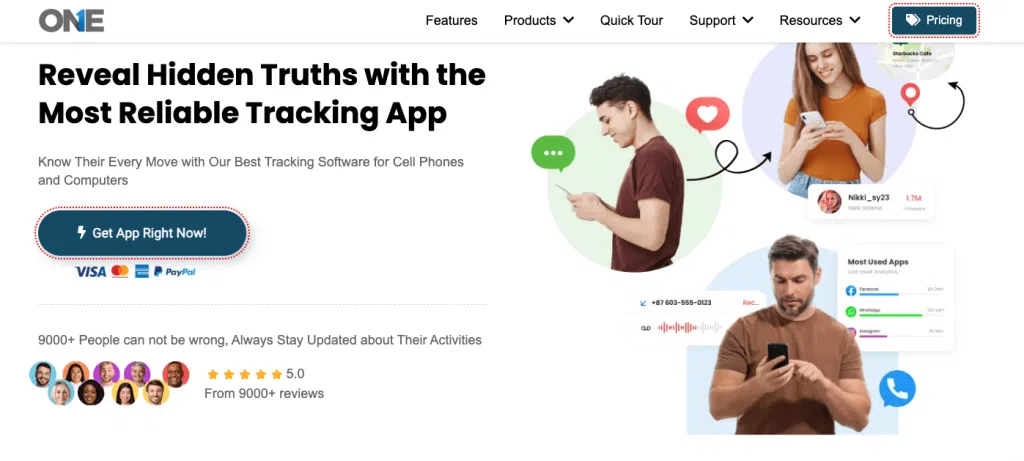
A famous, nevertheless, Monitoring App, popular for its amazing and advanced features. TheOneSpy VoIP call recorder allows customers to record voice over the internet without the target person’s knowledge. Moreover, they plan to get the customers’ trust by working completely hidden but providing top-notch tracking tools. The app enables you to track the recorded calls with the history of incoming, outgoing & missed calls. Plus, you can listen to calls from a specific person by filtering the VoIP call details. WhatsApp, Telegram, Viber, Facebook, and WeChat calls that were made on the internet and sent to the dispatcher for easy access. You can remotely get recorded calls with accurate pieces of information from the TOS server.
Pros:
- Record VoIP calls with great quality; you get no interruption while listening.
- Get the details of the contact who calls, sends, or receives.
- Completely hidden and secure when recording the calls made on Snapchat, WhatsApp, Facebook, Viber, etc.
- Budget-friendly and plans fulfil your requirements.
- An efficient custom support team resolves your issues within seconds.
Cons:
As such, there is no negative side to TOS, however
They need a physical installation once to get control of other call details.
OgyMogy:
Another masterpiece that offers to record the calls of the social media platforms, including Instagram, Facebook, WhatsApp, Tinder, and more. OgyMogy is working in stealth mode, delivering the best call recording solution so you never miss a chance to record important calls. Additionally, the OgyMogy voip call recorder operates well with accurate and real-time updates. It monitors every action of the target device with precise recording details, a nd you can access it anywhere from the OgyMogy online web portals.
Pros:
- Update you about the recordings in real time
- Know the needs of the VoIP calls, record them, and save them to the dashboard.
- Comes up wth the multiple premium plans.
- Easy to navigate wth its user-engaging features.
Cons:
Limited compatibilities, till now does not support iOS and macOS versions.
FonSee:
A modern call recorder allows you to record inbound and outbound calls, so there is no chance you will miss a crucial call. One of the best tracking tools was developed with human requirements in mind. The FonSee app is easy to use and direct with its user-friendly interface. Features like call recording are one of the most demanding things for customers. So, they can assure you that you can record the voices that happen online with clear and high-quality sound without disturbance.
FonSee runs in the background, completely hidden. It provides remote recordings of your target devices and is uploaded into your online web panel, so you can easily access it whenever you need.
Pros:
- Top quality sounds guaranteed.
- Easy installation process with a pocket-friendly plan.
- Save it to the dashboard automatically once done with the recordings.
Cons:
- No free trial is available; you have to select the plan, and all plans have minimal costs.
FlexiSpy:
FlexiSpy is a notable call recorder app that provides you with the desired features that you demand. Besides call recording, one of the oldest apps comes with many extra features. Although they have no vast range of features, the call recording of important sites can be done through the FlexiSpy apps. The app works discreetly, functioning well across multiple platforms. Once you install it, you get the FlexiSpy voip call recording functions; you can listen to the recorded history without being detected.
Pros:
- Better response to the call recordings
- Can record the particular person’s call details
- Can record calls automatically
Cons:
- Direct sound play is not supported; you have to download it to listen.
Call Recorder: Talker ACR
Talker ACR is a well-organised but small call recording software that records both VoIP and SIM calls. The advanced free spy tool available in the Google Play Store tracks Android devices or tablets. The app has standout features, letting users effortlessly record calls from WhatsApp, Facebook, Viber, and Google Teams. It’s a user-friendly interface, and I wanted to give you high-quality sounds.
Pros:
- Installation and configuration are simple.
- Comprehensive details of the VoIP recordings.
- Free, but trying to provide good sound quality
Cons:
- Conducted too many ads that sometimes frustrate users.
Call Recorder: Cube ACR
Let’s assume you are on important phone calls but miss a point, so what can you do then? You must have the app that records your Voip calls for you. So you can listen to the recording even if it has ended. Cuber ACR recorder is the option you can go with if you find the free version of the app. Provide the details of the recorded calls from the renowned social apps like Viber, Facebook, WhatsApp, etc., with Cube ACR, your cell phone becomes your partner and records your calls so you find them later to enhance your ideas.
Pros:
- Initiative and attractive user interface
- Supported free versions for Android devices (limited functions and with ads)
Cons:
- Users complain that it does not work properly sometimes.
Nextiva
If you want a phone that supports both video and audio, Nexita is here to address your challenges. Nexitva has premium plans, which you can use to get on-demand or automatic call recordings. Moreover, it lets you pause the recording whenever you need to. It stores your VoIP call details for over six months, and you need admin permission to download the recordings.
Pros:
Record calls automatically
For the US and Canada regions, you can make unlimited calls
Cons:
- The cost is not affordable to a typical user.
How TheOneSpy Set Up and Record VoIP Calls Secretly on Android?
This setup method is the same for every social media platform; we use WhatsApp as an example.
There are three steps to record WhatsApp calls secretly:
1) Download and install TheOneSpy
2) Activate the app by using the activation key
3) Open Dashboard and listen to recordings
Download and install TheOneSpy:
Download the app by visiting the URL provided by “theonespy.com” and installing it

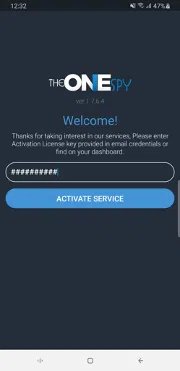
Activate the App by Using the Activation Key:
After installation, enter the activation key received through email from TheOneSpy. And Grant all requires permissions
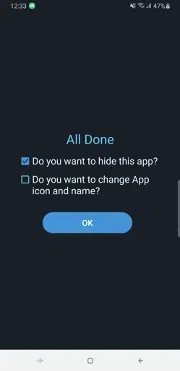
Hide app after granting all required permissions
Open Dashboard and Listen to Recordings:
Open the dashboard of TheOneSpy by visiting “https://console.theonespy.com/” on the browser and enter your username and password provided by email from TheOneSpy
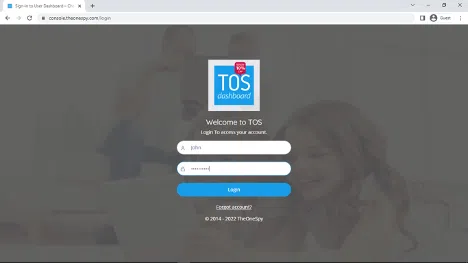
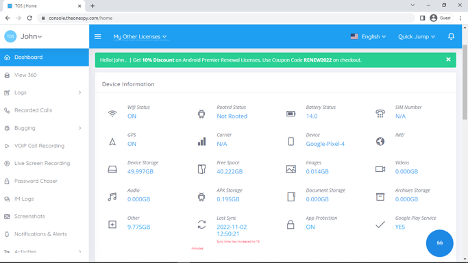
After login, Dashboard will show
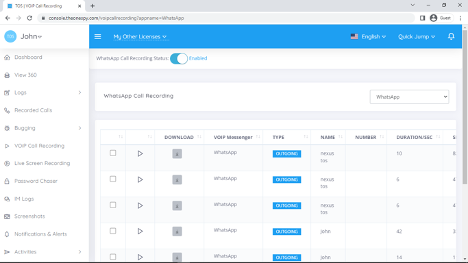
To Listen Audio or Video VoIP Call Tap on VoIP Call Recording. And a list of recorded calls will show here
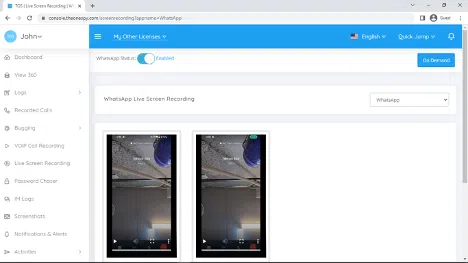
To view the video, Call Tap on Live Screen Recording. Select the messenger name from the side drop-down menu. A list of video call screen recordings will be shown here
According to the Pew Research Center:
- More than 77% of parents are worried about teens’ excessive social media apps and mobile screens.
- One out of three teens become the victim of cyberbullying via text messages, chats, media, and audio calls on social media
- 86% of teens are addicted to Instagram, and they share photos and voice chats
- 35% of teens do sexting via text messages and voice calls on WhatsApp, Facebook, and others
Why Record VoIP Calls on Social Apps such as Instant Messengers?
People these days look forward to recording and listening to voice calls on social messaging apps active on mobile devices connected to cyberspace. The question arises: what made people record calls on social messengers apps, no time ever before?
The social media-obsessed youth has made parents insecure, and kids are vulnerable to stalkers, child abusers, sex offenders, and bunny hunters. Do you know why? Young teens spend hours on messaging apps for voice chatting, texting, and sexting with strangers. They also exchange contacts and make voice and video calls on Facebook, WhatsApp, and other social networks with strangers. Therefore, parents want to safeguard teens from online predators, and they want to monitor cell phones and record VoIP calls.
Top 5 Benefits of VoIP Call Recording on Android
Live VoIP call recording has many benefits only for parents, employers, and many individuals. Here are a few advantages you can use get using the TheOneSpy VoIP call recording app.
Enhance Customer Care Service:
Business professionals can improve the customer care service of a business. Employers can leverage the use of call recording software to record VoIP calls of customer care representatives with clients. This technology allows you to assess the quality of customer interactions, identify areas for improvement, and ensure client satisfaction. So, prevent any misdealing of your employees with clients using social networks and phone conversations. Employers can save the recorded call data to the online dashboard of TheOneSpy software, providing a comprehensive view of customer interactions and enabling effective training and feedback.
Increase Business Productivity:
Employers can improve and enhance the productivity of their employees. Bosses deploy workers to engage clients via emails, phone calls, and social networking apps. You can monitor text conversations, voice and video chats in real-time by using a VoIP call recorder on business phones. You can train your employees and record voice calls during training sessions.
Identify Kid’s Inappropriate Voice Conversations:
Parents can use VoIP call recording software on kids’ cell phones connected to cyberspace and active with social networking apps. You can record Phone calls and video calls on Facebook, WhatsApp, Line, and Telegram to prevent online hookups with strangers. Young teens interact and respond to strangers online, and often make VoIP calls to get to know each other. Parents can listen to the voice chats in real-time and know and plan in VoIP chats on social messaging apps.
Keep Data of Calls that Happen on Social Networks:
You can preserve the live calls on instant messaging apps inbound and outgoing. Users can use the VoIP call recorder software. It can record voice calls on the target cell phone without root and save the data of the calls to the online control panel. VoIP calls data enable busy parents to listen to the voice conversations of teens to stay updated.
Resolve Disputes:
TheOneSpy is one of the few spy apps that can resolve the disputes between your customer service representatives and clients. VoIP call recording empowers you to listen to the conversations happening between employees and clients. It helps you to identify that your employees are doing a great job or just wasting time.
What Makes Employers Listen to Employees’ Conversations?
Customer care service is the backbone of a business. It keeps its clients loyal to the products by dealing with them humbly. However, bad dealings with clients can get them carried away, and they will not bother with your product again. Employers want to monitor employees’ chats, messages, emails, and voice conversations. This practice can help in identifying areas of improvement in customer service, preventing miscommunication, and ensuring client satisfaction.
Employers wish to record clients’ voice and text conversations on social media and cellular networks. This can serve as a valuable resource for training and improving customer interactions. Employers can record live phone calls using call recording software but cannot listen to voice conversations on social messaging apps. Business professionals also want to record disgruntled employees’ VoIP and phone calls to prevent the leakage of business secrets and information.
- 86% of employees monitor employee’s voice and text chats and emails
- 69% of employees attempt to waste working hours via voice calls and chat on social media
- 14% of employers have reservations about their customer care representatives
- Every second employer wants to listen to voice calls on business devices
Conclusion:
Do you want to record and listen to the VoIP chats of your teens and employees? You can use TheOneSpy, the best software for VoIP call recording, to protect your teens from potentially risky interactions on instant messaging apps. Moreover, you can identify the customer care services of your employees by listening to the voice calls to the fullest.
FAQs
VoIP call recorder works almost the same across different platforms. However, TheOneSpy continually runs on the backend. If a calling activity happens on target devices, the VoIP call recording function is activated and starts recording it. Once the call ends, it fetches the recording files and uploads them to the TOS database. You can access it from anywhere.
Yes, you can use free VoIP recording native apps like Cube ACR and Talker ACR. These apps perform well and record your VoIP calls, inbound and outbound. However, free tools arrive with huge risks, too. We do not recommend the free apps that compromise privacy. Your privacy is the key; if you use Free apps, they are not guaranteed to keep your identities secret from the target devices. So, choose a premium apps that hide your recognition to confirm a seamless VoIP call recording procedure.
When you talked about the VoIP call recording, the first word that came to your mind was the microphone. Yes, a Microphone is the best and finest source to record your VoIP calls when you install third-party apps. It integrates with a microphone and starts recording the voices.
No, if you use Apps like TheOneSpy. They will never know about your presence on their phones. TheOneSpy works silently in the background, records every call made on the internet, and stores it frequently in the TOS dashboard. So, the chances of being noticed are minor.
The answer is yes in some cases. However, the legal rights differ from country to country. If you record other calls, the idea of both sides’ consent is great. However, if you are a parent, company owner, or someone who does not leak their privacy but just wants safety and security, you can record calls without alerting them. But remember, always follow your country’s rules to avoid any unpleasant things.
No, when a person calls someone online, the TheOneSpy VoIP recorder records their voices and uploads them into the dashboard. However, uploading the recorded files to the server takes a few seconds if you have a good internet connection. So it might depend on the connection; with a poor connection, it may take several minutes, too.
TheOneSpy VoIP call recording feature is supported on devices that above Android OS 10. It functions well across Android devices like Samsung, Google Pixel, Motorola, Honor, Realme, and Huawei etc.