Here is the strangest fact in child online safety. After years of pressure, the platforms actually built parental controls — real ones, free, already on your child’s phone. And then almost nobody switched them on. By the end of 2022, fewer than 10% of teens on Instagram had parental controls enabled. On Snapchat and Discord, reporting put it at under 1% of minors.
That gap — not a missing feature, but an unused one — is where most families lose. This guide closes it: what to change, on which platform, in the order that matters. Then the honest part: what these settings genuinely can’t do, and what to do about that.
Where Your Child Actually Is
Before changing settings, know the terrain. Pew Research Center’s December 2025 survey of U.S. teens aged 13–17 found that roughly nine in ten (92%) use YouTube, 68% TikTok, 63% Instagram, and 55% Snapchat — with 36% saying they’re on at least one of these platforms “almost constantly.” Facebook has collapsed to 31%; if your mental model of “social media” is Facebook, it’s a decade out of date.
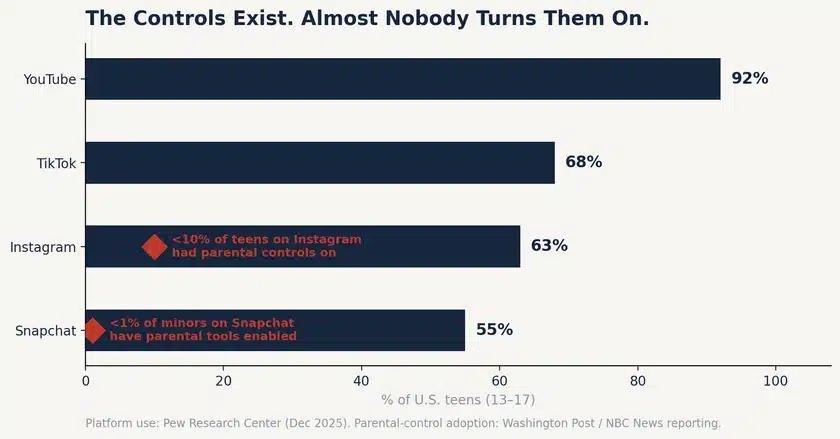
Figure 1 — The platforms built the safety tools. Adoption never followed. Sources: Pew Research Center (Dec 2025); Washington Post and NBC News reporting on parental-control uptake.
Two things have changed recently that most safety articles haven’t caught up with. First, WhatsApp is climbing — 24% of teens now, up from 17% in 2022. Second, and bigger: roughly two-thirds of teens now use AI chatbots, about three in ten daily. Your child’s “social media” increasingly includes conversations with software, which no privacy setting on this page addresses.
The Settings, Platform by Platform
Do these with your child, not behind their back — it takes twenty minutes, and it teaches them how the machinery works. Menu names shift; the concepts don’t.
- Teen Accounts are now the default for under-18s — private by default, with messaging limited to people they follow. Verify it actually applied; an account created with a false birth year won’t get it.
- Turn on Supervision (Settings → Supervision) to see who they follow, set time limits, and get notified of reports.
- Restrict message requests from non-followers, hide Story from strangers, and switch off “Show activity status.”
TikTok
- Family Pairing links your phone to theirs: screen-time limits, restricted content, direct-message controls, and search restrictions.
- Set the account to private, disable “Suggest your account to others,” and turn off downloads and duets/stitches for younger teens.
- Note: accounts registered as under-16 have DMs disabled entirely — another reason a false birthday costs real protection.
Snapchat
- Family Center shows who your teen has messaged in the last seven days (not the content) and lets you report accounts. This is the platform where fewer than 1% of minors have it enabled — and the one where teens message most: 57% of teen Snapchat users message daily.
- Switch off Snap Map location sharing or set Ghost Mode. This is the single highest-value toggle on this entire page.
- Set “Contact Me” and “View My Story” to Friends Only; disable Quick Add.
YouTube
- 92% of teens are here — it deserves more attention than it usually gets. Turn on Restricted Mode, and use a supervised account for under-13s.
- Turn off autoplay. It is the mechanism that converts “one video” into two hours.
WhatsApp and Discord
- WhatsApp: set “Who can add me to groups” to My Contacts, and lock down Last Seen, profile photo and About.
- Discord: enable the Family Center, restrict DMs to friends, and switch on the explicit-content filter for all servers.
Across every platform — the four that always matter
- Private account by default.
- Location sharing off.
- Messages restricted to people they actually know.
- Real birthday. Every protection above is triggered by the age on the account — a false birth year silently disables all of it.
What Settings Can’t Do
Now the honest part, because a checklist that oversells itself is worse than no checklist. Privacy settings control reach — who can find and contact your child. They do almost nothing about the three risks that actually hurt kids.
- Cyberbullying usually comes from people your child already knows. A private account doesn’t block a classmate — and roughly three-quarters of teens on TikTok, Instagram and Snapchat say harassment is a problem for people their age.
- Sextortion begins with a friend request that looks ordinary and moves to an encrypted app within minutes. NCMEC logged over 50,000 financial sextortion reports in 2025 — 137 a day — with boys aged 14–17 the main targets. No toggle stops a child who chooses to reply.
- Time and mood aren’t setting problems. The average teen spends 4.8 hours a day on social platforms; the Surgeon General links 3+ hours to double the risk of anxiety and depression. There is no privacy menu for that.
Which is why the settings are step one, not the answer. The things that actually move the needle are unglamorous: no devices in bedrooms overnight; a standing conversation about what they’re seeing; and an amnesty clause — if you bring me a problem, even one you caused, my first job is to help, not punish. In sextortion cases that single promise is the difference between a child who tells you on day one and one who pays a blackmailer in silence.
Where a Monitoring App Adds Something Settings Don’t
Platform settings can’t tell you that an unknown number started messaging your twelve-year-old on Tuesday, or that the words in their chats have shifted toward something worrying. That’s the specific gap a parental monitoring app fills.
TheOneSpy covers social and messaging activity across Android, iPhone/iPad, Windows and Mac from one dashboard — with alerts for unknown contacts and risk keywords rather than a live feed of your child’s day. Two conditions, the same as everywhere on this site: your child knows it’s installed, and it scales back as they grow. It suits younger teens and higher-risk situations; it is not a substitute for the twenty minutes of settings above, which are free and should come first.
Start with the toggles. If they cover your family’s needs — and for many families they will — you’re done.
Frequently Asked Questions
What are the most important social media safety settings for kids?
Four, on every platform: private account, location sharing off, messages restricted to people they know in real life, and — critically — the real birthday on the account, because age is what triggers every other protection. Then the platform tools: Instagram Supervision, TikTok Family Pairing, Snapchat Family Center, YouTube Restricted Mode.
Do social media parental controls actually work?
They work for what they do — limiting who can find and contact your child. They don’t address bullying from people your child already knows, grooming that moves to another app, or time and mood. The bigger problem is adoption: fewer than 10% of teens on Instagram had parental controls enabled, and under 1% of minors on Snapchat.
What age should a child join social media?
Most platforms set 13 as the minimum, and it’s worth honoring — not because 13 is magic, but because an account created with a false birth year silently loses every under-18 protection the platform provides, including restricted DMs and default-private settings.
Which platform is the riskiest for teens?
It depends on the risk. Snapchat sees the heaviest messaging (57% of teen users message daily), and its disappearing content plus Snap Map location make it the highest-value place to check settings. But YouTube reaches the most teens (92%), and sextortion attempts typically begin on whichever platform the child is most active on.
What about AI chatbots?
This is the newest gap. Roughly two-thirds of teens now use AI chatbots, and about three in ten do so daily — and no social media privacy setting covers those conversations. Ask your child which ones they use and what they talk about; treat it as a normal part of the digital conversation, not a separate crisis.
Sources
- Pew Research Center — Teens, Social Media and AI Chatbots (December 2025); Teens’ Experiences on TikTok, Instagram and Snapchat (2026)
- Washington Post — reporting on Instagram parental-control adoption (January 2024)
- NBC News — reporting on Snapchat and Discord parental-tool adoption (March 2024)
- NCMEC — CyberTipline financial sextortion data (2025–2026)
- U.S. Surgeon General — Advisory on Social Media and Youth Mental Health (2023)
- Gallup — Teen social media time-use survey