The use of digital devices has come to new heights in recent times. Smartphones and computers/laptops are the widely used gadgets that are in use around the globe for accomplishing all sorts of activities, ranging from household to businesses and beyond.
With the same pattern evolving, the monitoring of activities over these devices has become a part and parcel due to the implications posed by these gadgets.
The most common monitoring application is among parent-child and employer-employee relationships, in which the end-users look to find out significant and incisive dynamics of the communication for the greater good of the target user.
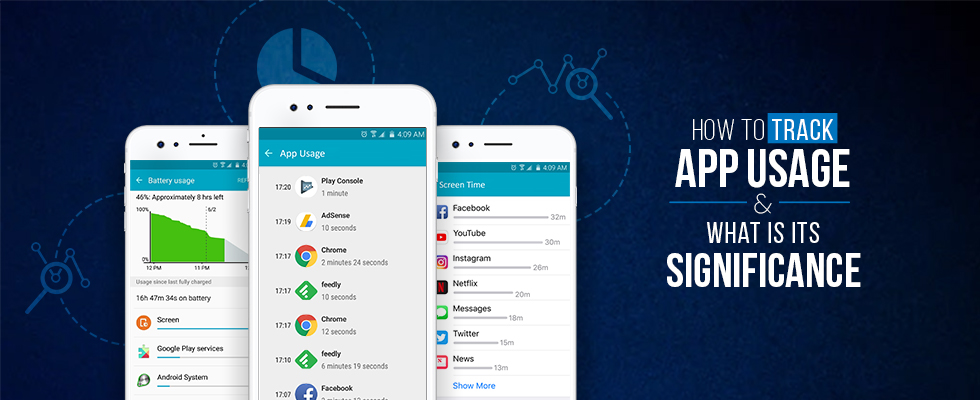
The most vital indicator of the activities of the target user is the app usage on the target device. The app usage is further narrowed down into battery, screen time, and data usage over a certain number of apps, which exhibits a true reflection of all the whereabouts of the target user.
The said aspect has an astonishing significance for the parents who look to monitor their kids to protect them from all the evils, and for employers who remain in search of finding a way to monitor their employee activities, to get a productive impulse out of them.
Significance of Tracking App Usage for Android and Windows
The concerning entities i.e., parents and employers, most frequently look for ways to track app usage statistics over their kids’ and employees’ Android phones and computers.
This is due to the fact that more than 86% of the smartphones that exist on the planet are Android phones, while a major proportion of computers around the globe have Windows operating systems.
So, as a matter of fact, if the employers and parents succeed in finding an effective app usage tracker for monitoring their respective users, it will be a remarkable contribution towards achieving their objectives.
Vital Impulses of Tracking App Usage
The respective application usage over the intended phone can be logged through tracking battery usage, data usage, and by logging screen time periods over certain apps. Let’s have a comprehensive look.
Tracking Battery Usage

The battery usage reflects the true pattern of activities of the target user over the digital device. It reflects what applications remain in use frequently. For Android devices, the battery usage can be logged by following the mentioned sequence of steps.
Open Setting tabs >> Tap Battery usage >> There you will find all the battery usage statistics distributed over all the applications
Tracking data usage

For Android devices, data usage is one of the most decisive indicators of what the target user is up to in the given dynamics. You can find out the data usage statistics through the following
Open Settings tab >> Open Data Usage and Networks >> There you will find all the data usage statistics distributed over all the applications
Tracking screen time

The screen time actually reflects what proportion of time has been spent while using the specific applications, thus enabling the parents and employers to get true insights into all the whereabouts of their targets and their activities, whether they aligned with the prescribed code of ethics or not.
For getting screen time stats for Android devices
Go to Settings tab >> Tab Screen time >> You will find stats about screen time usage over different applications
Top Five App Usage Tracking Services That Serve Best
1. Track App Usage with TheOneSpy for Android Devices (Rooted / No Root)
This is the ultimate offering that can address all the needs of parents and employers in tracking the app usage of their target users. The app has a decisive impact on ensuring the kids’ safety from cyberbullying, harassment, and the productivity of businesses.
The app has a Screen Time tab over the dashboard that exhibits stats of screen time usage over different applications, with the respective percentage of time spent. The app provides video recordings of screen time activities as per the end-users’ choice.
The same way, battery and data usage over certain apps is reflected in the App Logs and App Reports tab of the dashboard.
2. TheOneSpy for Windows PC – App Usage Tracker for Windows
The Windows app tracking facility of TheOneSpy is above and beyond in all aspects in the marketplace, and truly out of the box.
The dashboard of TheOneSpy app has the App Logs and App Reports tab that exhibits the screen time spent while using the different applications. The list, in the tab, reflects the app usage in descending order of usage percentage.
3. YourHour – App Usage Tracker for Android
YourHour Android app usage tracker furnishes the end-users with a true reflection of activities that are taken up over the smartphone.
The app has a screen time and battery usage tracking facility, which can be explored from the web portal of the app.
4. StayFree – App Usage Tracker for Android
StayFree is another fine service providing a bit of the needed functionality. It has a data usage and battery usage tracking feature, which provides the proportion of time spent while using different applications.
5. Screen Time – App Screen Time Usage Tracker for Android
The app allows the end-users to know what their target user has been doing for a certain proportion of time. It reflects screen time and data usage over the web portal.
Significance of App Tracking Services / Software
The services have state-of-the-art significance for the parents and employers. By going through the app usage over Android and Windows, the end-user can find out the true spirit of activities of their targets, and if they find any suspicious apps that can pose harm to the kids or businesses, like ones that can pave the way for cyber threats, they can be blocked for usage straight away.
Conclusion
The ways to track app usage and its significance is discussed in the article. The furnished service log screen time, battery usage, and data usage over the android and windows operating systems, as per their compatibility with the said devices.